


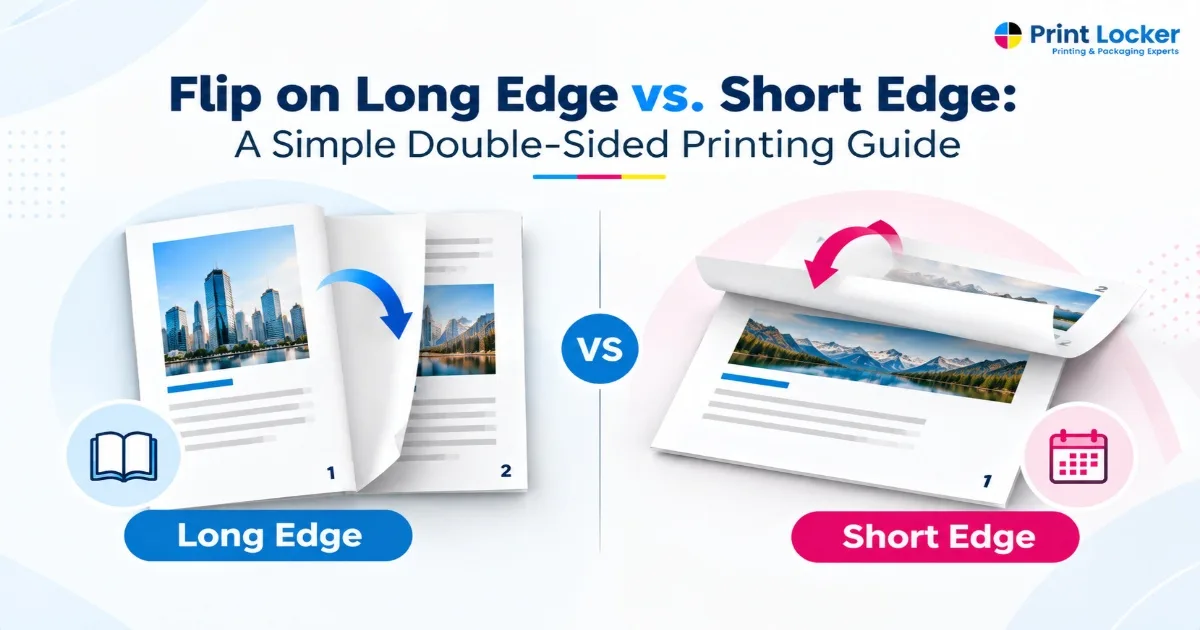
There are two options when printing a document on both sides of paper, and you may see options such as “Flip on long edge” and “Flip on short edge”. If you don’t know what that means, then picking the wrong option may leave the back side of your page appear upside down.
Luckily, the difference is clear, and this article explains what flip on long edge vs. flip on short edge means and how to use them correctly.
What Does “Flip on Long Edge” Mean?
The term Flip on long edge refers to turning the paper on its long edge, just like turning the pages of a book.
The long edge of the standard portrait document is the left or the right side of the page. By using this option while printing double-sided, the front and the back pages are positioned for normal book-style reading.
When should you use Flip on Long Edge?
It is generally a good choice when:
- Your document is in portrait orientation.
- You want pages to turn like a book.
- You are printing reports, manuals, or booklets.
- You want a standard double-sided reading format.
For example, when you choose Flip on Long Edge, the pages are designed to turn from the side, similar to turning the pages of a book. This is usually the right choice for standard portrait documents, including reports and booklets. Booklets Printing Services in Los Angeles can also use this format when producing multi-page materials designed for easy, book-style reading.
If you are unsure whether to print on long edge vs short edge, think about how you want to physically turn the finished pages.
What Does “Flip on Short Edge” Mean?
Flip on Short Edge means the paper is turned from its shorter side. Instead of opening like a traditional book, the pages can flip upward or downward, similar to a calendar or notepad.
This option is ideal for landscape documents, however, the right setting really depends on how the final pages need to be read.
When is Flip on Short Edge useful?
You may want to choose it when:
- Your document is in landscape orientation.
- You want pages to flip from the top.
- You are printing calendars.
- Your presentation or layout requires a different page orientation.
For example, Flip on Short Edge changes how the back page is oriented to allow for a flip to happen from the short side. This is particularly helpful for layouts requiring flipping from the top and certain landscape documents.
Knowledge of long edge vs short edge printing before starting on a large project helps prevent pages from getting oriented incorrectly.
Flip on Long Edge vs. Short Edge: What’s the Difference?
The main difference between flip on long edge vs. short edge is the direction in which the printed page is designed to turn.
| Feature | Flip on Long Edge | Flip on Short Edge |
| Page movement | Turns from the long side | Turns from the short side |
| Similar to | Book | Calendar/notepad |
| Common use | Portrait documents | Landscape documents |
| Best for | Reports, manuals, brochures | Calendars, landscape documents |
| Double-sided orientation | Standard reading direction | Alternative orientation |
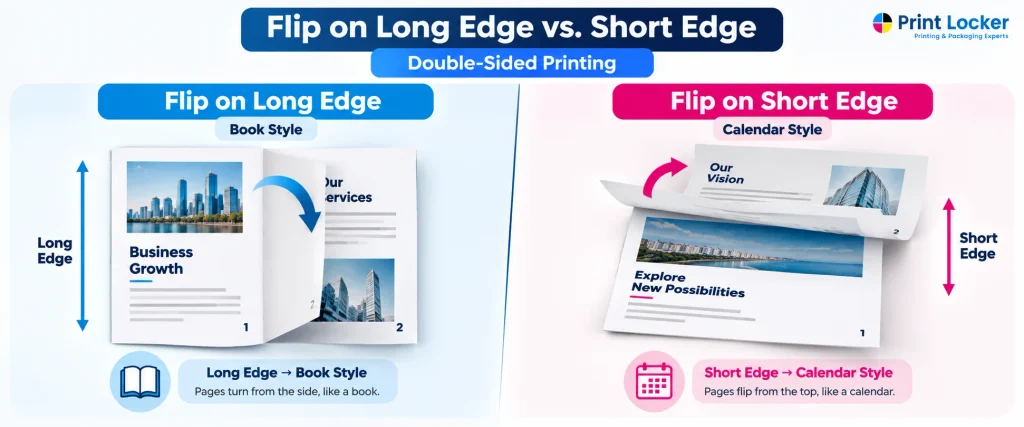
Choosing between long edge and short edge printing all depends on the orientation of your document and how you want to read the finished document.
For a typical portrait document, Long Edge usually provides a book-style reading experience. For a landscape document that needs to flip from the top, Short Edge may be more suitable.
Thus, choosing between long edge vs. short edge printing options is more about the specific layout of the document than about the better choice.
Long Edge vs. Short Edge Printing: Which One Should You Choose?
There is no single option that works for every document. Consider how your pages are positioned and how you want them to turn.
Choose Flip on Long Edge When:
- Your document is a portrait.
- You want pages to turn like a book.
- You are printing reports or manuals.
- You want a standard double-sided reading format.
For example, a multi-page business report that is designed to be read from left to right will usually work well with Long Edge.
Choose Flip on Short Edge When:
- Your document is landscape.
- You want pages to flip from the top or short side.
- You are printing calendars.
- Your layout requires a different page orientation.
When deciding between long edge vs. short edge printing, always consider the final physical use of the document rather than simply selecting the first option you see.
Long Edge vs. Short Edge Printing Example
A simple example can make the difference easier to understand.
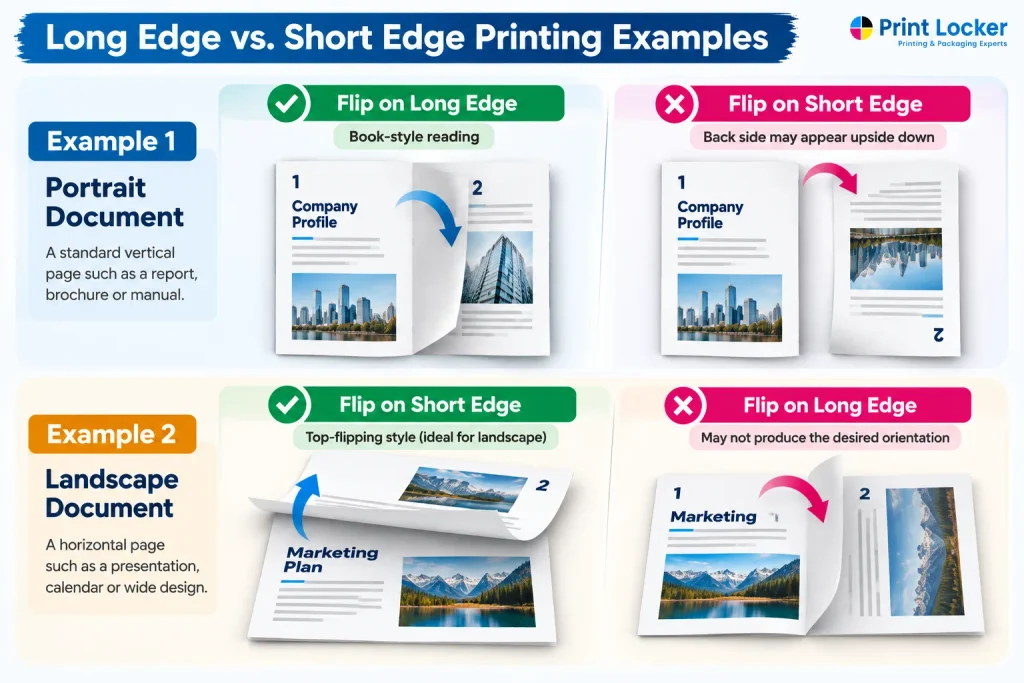
Example 1: Portrait Document
Imagine a standard letter-size report in portrait orientation.
Flip on Long Edge → Book-style reading
The pages turn from the side, making them easy to read like a book.
Flip on Short Edge → Back side may appear upside down
If the wrong setting is selected, the second side may not have the orientation you expect.
Example 2: Landscape Document
Now imagine a wide landscape document.
Flip on Short Edge → Often suitable for top-flipping layouts
The pages can be turned upward, similar to a calendar.
Flip on Long Edge → May not produce the desired orientation
The back side may be oriented differently from what you expect.
A quick test print is often the easiest way to confirm the correct setting before printing a large quantity.
How to Select Long Edge or Short Edge in Print Settings
The exact wording can vary depending on your printer, computer, and printing software but the basic process is usually similar.
- Open the Print dialog from your document.
- Select Print on Both Sides or Duplex Printing.
- Find the Flip, Binding, or Page Orientation option.
- Choose Long Edge or Short Edge.
- Print a test page before starting a large print job.
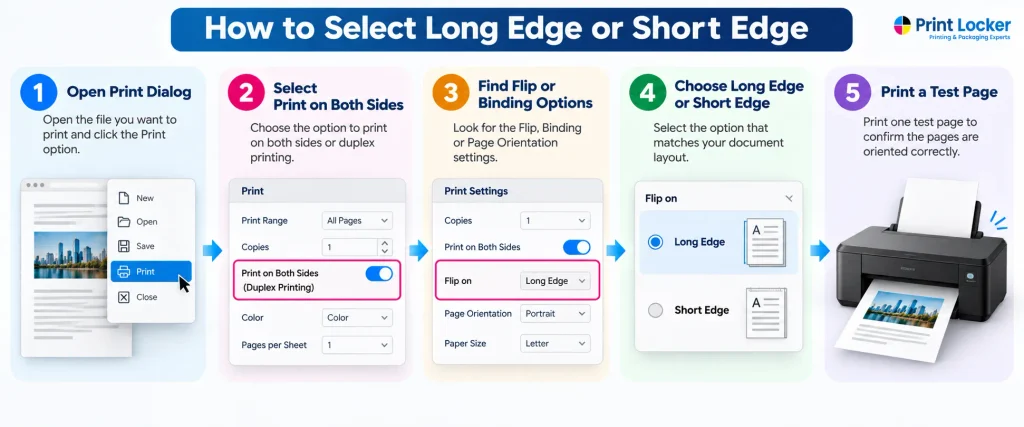
If the back side of your test page is upside down or opens in the wrong direction, go back to the print settings and select the other flip option.
Common Mistake: Choosing the Wrong Flip Option
One of the most common double-sided printing mistakes is selecting the wrong edge. When this happens, the back side of the page can appear upside down or have an unexpected orientation.
A simple rule can help:
Portrait + book-style reading → Long Edge
Landscape + top-flipping layout → Short Edge
However, your document design can affect the result, so it is always smart to check one test page before printing hundreds of copies.
For professional documents such as brochures, reports, manuals, and other marketing materials, choosing the correct double-sided printing setting helps maintain a clean and readable final result. If you are preparing a large or professionally printed project, a Printing service in Los Angeles can help ensure your files are set up correctly for double-sided production.
❓ FAQs
Q1: What is the difference between flip on long edge and short edge?
Long Edge turns pages from the longer side, like a book. Short Edge turns pages from the shorter side, more like a calendar or notepad.
Q2: Should I print on long edge or short edge?
For most portrait documents that should read like a book, choose Long Edge. For certain landscape or top-flipping layouts, Short Edge may be better.
Q3: Is long edge or short edge better for double-sided printing?
Neither is always better. The right choice depends on your document orientation and how you want the pages to turn.
Q4: What does flip on long edge mean when printing?
It means the printer positions the back side of the page so it can be turned from the longer edge, similar to a book.
Q5: What does flip on short edge mean when printing?
It means the printer positions the back side so the page can be turned from the shorter edge, which is often useful for calendars and certain landscape layouts.


