
A tri-fold brochure is an effective method for presenting information about your products and services in a compact manner. However, it is important to fold the brochure properly. Poorly folded brochures can give a misaligned cover or edge and incorrect alignment of text in the folds.
The good news is that folding a tri-fold brochure into an organized piece is fairly easy as it only requires a few simple steps to follow. Whether it is for marketing materials, events or product launches, knowing the folding procedure can help you create a good end result.
What Is a Tri-Fold Brochure?
A tri-fold brochure makes use of a single sheet which is folded two times to form three panels. When the brochure is fully opened, it comprises six panels.: three on the front and three on the back.
Each of these panels can provide different information like a business introduction, product information, service description, and contact information.
Tri-fold brochures are commonly used for:
- Business and service promotions
- Product information and sales materials
- Restaurant menus and travel guides
- Event announcements and informational handouts
A tri-fold brochure is often made using a letter fold, also called a roll fold. One outer panel folds inward first and the other outer panel folds over it to close the brochure.
The tri-fold document allows for a compact size for distribution while the unfolded sheet provides ample area for organizing information in sections.
How to Fold a Tri-Fold Brochure Step by Step
Follow these five steps to fold a tri-fold brochure neatly. If you are folding a printed brochure, check the design first so you know which panel should become the front cover.
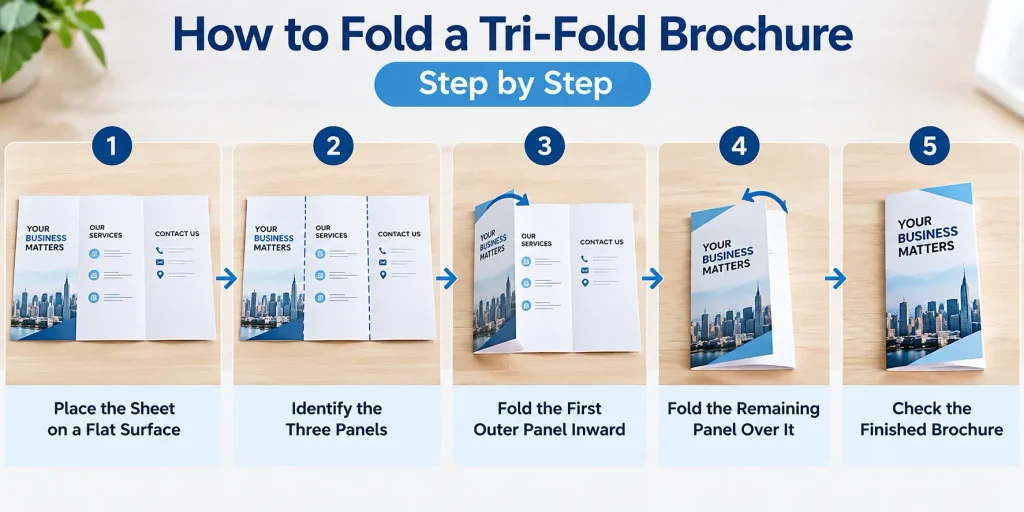
Step 1: Place the Sheet on a Flat Surface
Set the printed sheet on a clean, flat table. Ensure that the paper is straight and free of any wrinkles or bent edges.
Check the design to identify the front cover, back panel and inside content. If you are folding a blank sheet before printing, mark the three panels lightly with a pencil.
Step 2: Identify the Three Panels
Look at the sheet and identify its three vertical sections. For a standard letter-fold brochure, one outer panel is usually slightly narrower than the other two.
This small difference gives the tucked-in panel enough room to fit inside without bulging. If you are using a professionally printed brochure, follow the panel layout specified in the artwork.
Step 3: Fold the First Outer Panel Inward
Take the outer panel designed to sit inside the brochure and fold it toward the center. Align its edge with the intended fold position, then press gently along the crease.
Avoid folding by eye alone if you need several brochures to look identical. Using a ruler or a bone folder can help you create a straighter, more consistent crease.
Step 4: Fold the Remaining Panel Over It
Fold the other outer panel over the first panel to close the brochure. The front cover should now be visible on the outside.
Check that the edges align neatly. If the brochure does not close properly, reopen it and check whether the panels are the correct widths and whether you followed the intended folding direction.
Step 5: Check the Finished Brochure
Close the brochure and inspect it from the front, back and sides.
Make sure:
- The front cover is facing the correct direction.
- The outer edges line up neatly.
- The panels lie flat without bulging.
- The text and images are not hidden by an incorrect fold.
If you are folding multiple copies, use the first completed brochure as a reference so the remaining copies follow the same pattern.
If you need professionally printed brochures for an upcoming promotion, event or business presentation, explore Tri-Fold brochure printing in Los Angeles. Before placing an order, check the panel layout, folding specifications, paper options and artwork requirements to ensure your design is ready for printing.
How to Arrange the Panels Before Folding
Folding does not complete the task. The printed content has to be arranged properly to ensure that the readers can view each panel of the brochure in the sequence you intended.
If it is a tri-fold brochure, it has six panels, but their configuration is different based on whether you view the outer or inner side of the flat paper sheet.
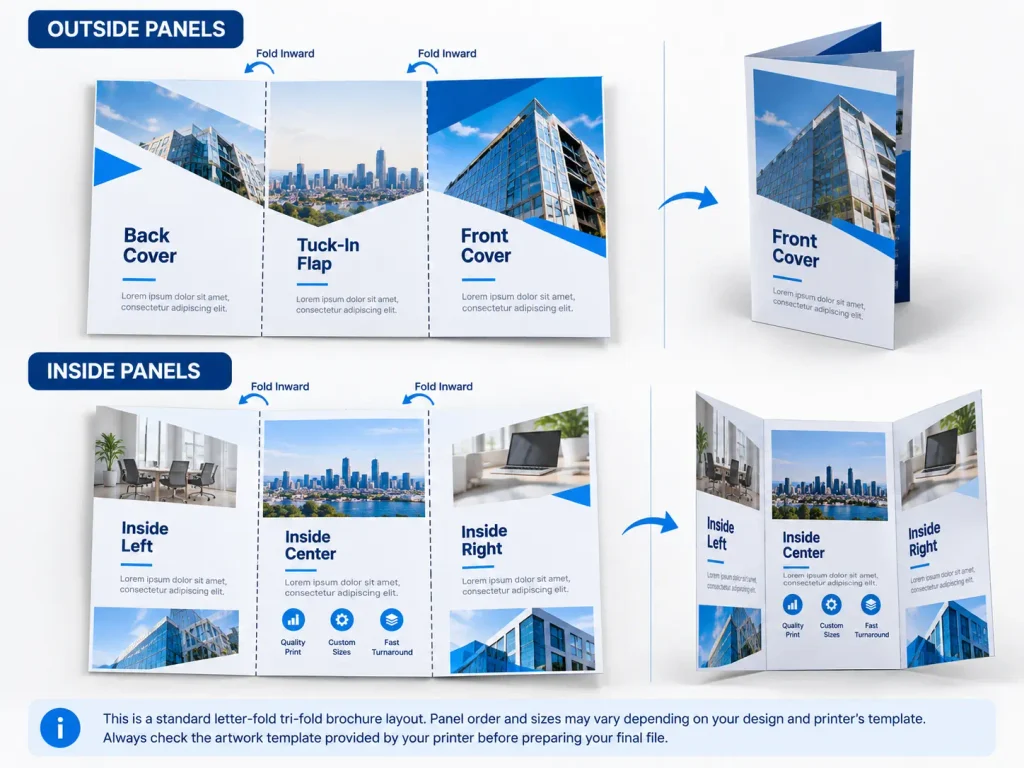
For a typical letter-fold brochure, the layout commonly follows this pattern:
Outside of the brochure:
- Front cover
- Back cover
- Tucked-in flap
Inside of the brochure:
- Inside left panel
- Inside center panel
- Inside right panel
The proper order from left to right on the flat sheet is dependent upon the way the sheet is folded and the way the graphics are laid out. Use a folding sample or the printing company’s template for the fold instead of just presuming that the format has to be the same on both sides.
Should All Three Panels Be the Same Size?
Not necessarily. In a letter fold, the panel that fits inside is typically slightly narrower than the other panels, allowing the brochure to be folded seamlessly without creating a bulge in the paper.
The Z-fold brochure is different since its panels fold in opposite directions. Thus, the shapes and layout of the panels may not be the same as in a letter folded brochure.
Before designing or printing your brochure, confirm the finished size, panel widths and fold type. This helps prevent text from crossing fold lines or important information from appearing in the wrong place. If you are preparing brochures for your business or marketing campaign, Brochure Printing in Los Angeles offers options for different brochure formats, sizes and printing requirements.
Common Tri-Fold Brochure Folding Mistakes
Even a simple fold can look untidy if the panels are not prepared correctly. Watch out for these common mistakes.
Folding the Panels in the Wrong Direction
If you fold the wrong panel first, the front cover may end up inside or the brochure may close in the wrong direction. Identify the cover and tuck-in panel before folding.
Using Incorrect Panel Widths
Three equal panels may not work for every letter-fold design. If the tucked-in panel is too wide, the brochure may bulge or resist closing. Follow the dimensions in your printer’s template.
Placing Text Too Close to Fold Lines
Text, logos and important images placed directly on a fold can look awkward or become difficult to read. Leave enough space around fold lines and keep essential content within the recommended safe area.
Printing the Outside Panels in the Wrong Order
The front cover, back cover and tucked-in flap must appear in the correct positions on the outside of the flat sheet. Check the artwork using a folding mockup before sending it to print.
When folding a tri-fold brochure the right way, your marketing materials will be organized and sophisticated. Know the panels, know the folding direction, and check the edges of the brochure. If you want to create brochures then you should pay extra attention to the panel arrangement and print specifications to get the best results possible.
PrintLocker, a printing company offers professional services for businesses where you can create printed marketing materials. Make sure to consider the artwork and find the available sizes, folds and printing options for your order.


